 Solutional
This case study describes how a small Android maintenance update turned into a production incident, and how platform rules made recovery slower than the technical fix itself.
Timeline Updates
Update 1: Hacker News Traffic, but No Google Response
I submitted the article to Hacker News on August 27. The discussion included useful Android release strategies as well as plenty of criticism. The post reached the front page and attracted about 130,000 unique visitors over several days.
Our static site handled the traffic on a VPS costing roughly €5 per month. The attention did not, however, lead to any response from Google, and the app update remained in review.
Update 2: Finding Google Play Support
On September 1, I discovered that Google Play Console offered a support chat behind the question-mark icon. The support agent promised to expedite the review, but the conversation did not provide a clear timeline or resolution.
It was striking that nobody in the large Hacker News discussion had mentioned this route. Google's reputation for difficult-to-reach support may explain why developers do not expect direct help to be available.
Update 3: The Fix Reaches Production
On September 4, after 11 days in review, the update was finally published. I then submitted a smaller follow-up release using a staged rollout instead of immediately releasing to 100% of users. That update passed review in less than an hour.
Update 4: A New Review Halted the Previous Rollout
On September 7, another small update was submitted to replace a version that had reached 99.9999% of users. As soon as the new version entered review, Google automatically halted the previous rollout without warning.
If the new review had taken days, the earlier release would still have been unavailable to the remaining users. Withdrawing the new submission did not restore the previous rollout. Fortunately, this review finished in less than an hour.
We were responsible for maintaining a legacy Android application used by our client's customers. The app had been functionally complete for years and was not under active development. Ideally, we would have left the stable version untouched.
Google's Android API-Level Requirement
The situation began with an email from Google on August 18, 2023:
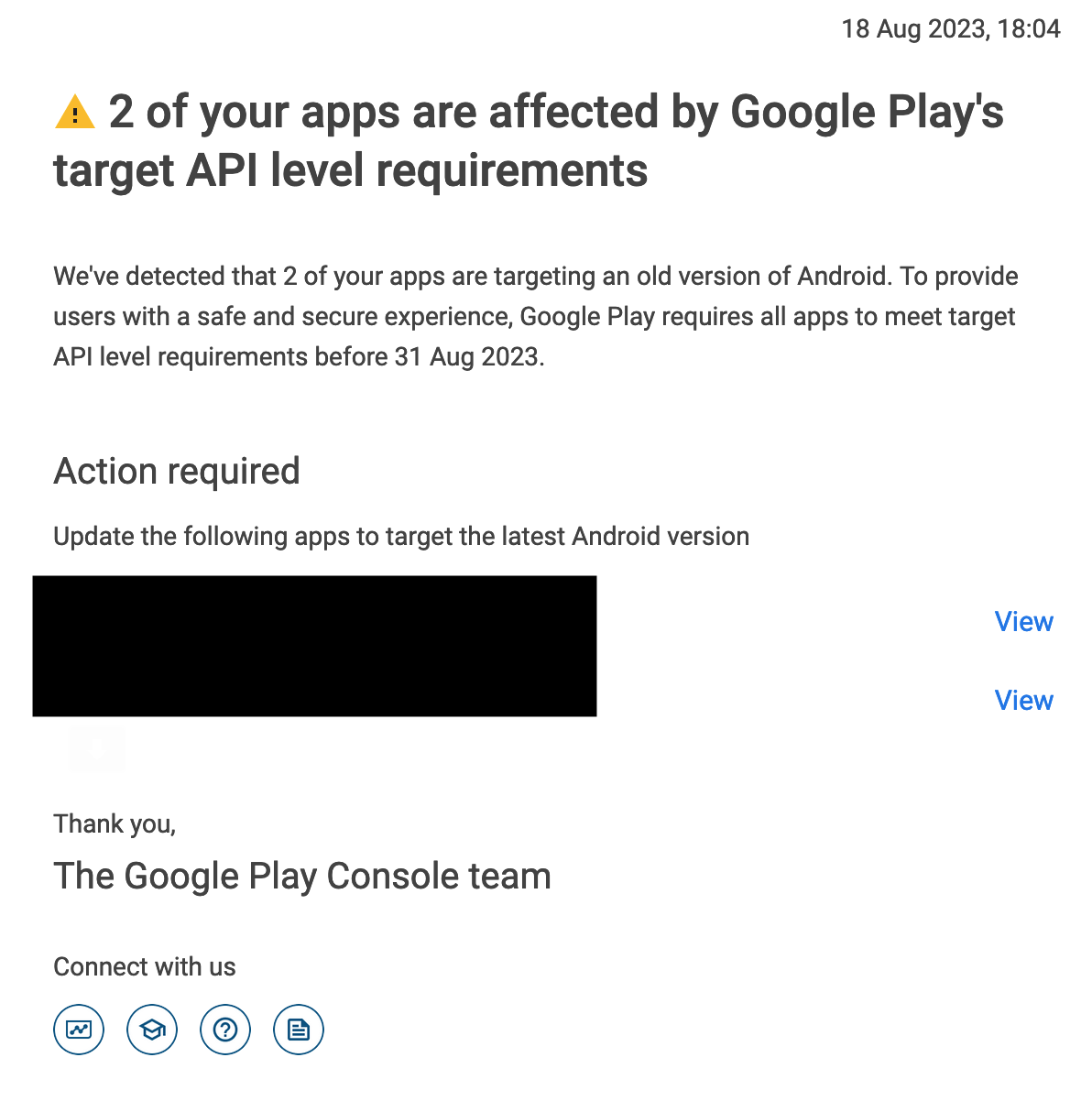
While looking for more detail, I found the following requirement on Google's website:
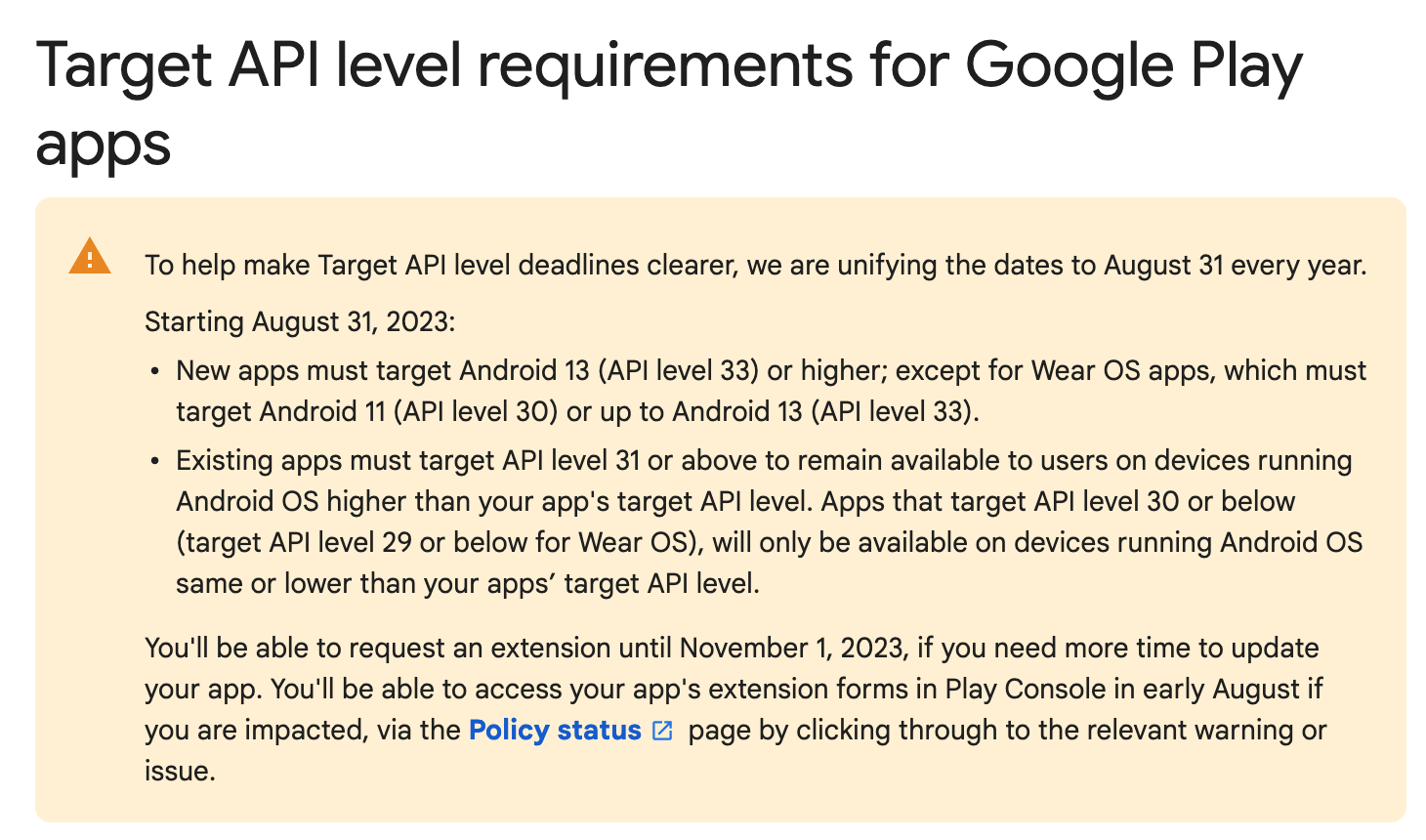
The critical sentence said that existing apps had to target API level 31 or higher to remain available to users on devices running an Android version above the app's target level.
The exact impact on already-installed applications was unclear. I chose the safer interpretation and prioritized the update, even though it delivered no new business value. The deadline was less than three weeks away, and Google had not sent earlier reminders about the requirement.
Updating the Android Target SDK
I started the work on August 23. The app's targetSdkVersion was raised from API level 30 to 33, after which I compiled and ran it in an Android emulator.
The first build failed because of an incompatible analytics dependency. Fortunately, the dependency was not closely tied to the business logic, so it could be removed.
After that, the application launched successfully and its core functions appeared to work as before. The update was ready for Google Play.
The First Google Play Release
Publishing the update was initially straightforward. Because the legacy app was updated only once or twice per year, Google required several questionnaires to be completed. That was expected.
The release entered review, was approved in less than an hour, and reached production. At that point, the change appeared routine.
The problems began later that evening.
A Production Crash on Android 13
At around 21:30, our client reported that a customer could not log in with the new app version. The issue did not immediately look connected to the SDK update.
I then tested the release on a physical Android device, which had not been available during the earlier work. Immediately after login, the application crashed.
Further investigation showed that the failure affected the newest Android version at the time, Android 13. Older versions worked correctly. I had tested with an older emulator image, so the compatibility problem had not appeared.
Testing several Android versions would have caught the issue. The minimal scope of the change and the deadline pressure created false confidence, but the missing test coverage was still our mistake.
Why Rolling Back Was Not Possible
The safest first response would normally be to restore the previous working release and investigate the crash during normal working hours. Google Play did not provide that option.
There was no way to withdraw the latest production release and reactivate the previous version.
The next idea was to restore targetSdkVersion 30, increase the application version, and publish a new build. Google Play rejected that build because new updates were required to target API level 33, even though the published guidance appeared to allow older targets until September 1.
I requested an extension that should have allowed API level 30 until November 1, but the publishing error remained. The only viable path was forward: fix the Android 13 crashes and submit another release.
Fixing the Crash Under Time Pressure
By then, users were gradually receiving the broken version through automatic updates. The faster a corrected build reached production, the fewer customers would be affected.
Fortunately, the crash could be reproduced on an Android 13 emulator and required only a small number of code changes. The risk was that the work was happening late in the evening, under pressure, with limited time for comprehensive regression testing.
The plan was pragmatic:
- Fix every known crash.
- Test the most important flows.
- Submit a corrected version immediately.
- Continue broader testing and prepare another update if necessary.
The new build was submitted to Google Play. After two hours in review, it was still waiting. At around 01:00, I went to sleep hoping it would be approved by morning.
The Next Day: Still In Review
The application was still marked in review when I woke up.
Most of the day was spent testing Android 13 and repeatedly checking Google Play Console. We found and fixed a few smaller issues, but nothing as severe as the login crash.
By the end of the day, the production fix had still not been approved.
The Platform-Control Problem
Mobile developers have reported many similar cases in which Google or Apple delays an urgent production fix, removes an application, or provides little explanation for a decision.
The technical team may be able to diagnose and correct a defect quickly, yet the app-store operator controls when users receive the solution. There may be no rollback, no alternate distribution route for ordinary users, and no reliable way to accelerate review.
That dependency changes the nature of production ownership. A company can own the source code and infrastructure while still lacking control over the final delivery channel.
This experience reinforced my long-standing preference for open web platforms whenever a native mobile application is not genuinely necessary. Web applications can often provide the required functionality while allowing the team to deploy, monitor, and roll back releases directly.
Native applications still have valid use cases, especially when they depend on device capabilities, background behavior, or app-store distribution. But the operational cost should be considered alongside the product benefits. Choosing mobile means accepting a powerful third party in the release process.
At the time the original article was written, the corrected build had been waiting about 72 hours. The code was fixed; the production problem remained because publication depended on an opaque review queue.
Hope should not be a release-management strategy, but in that moment it was the only option available.